
Table of Contents
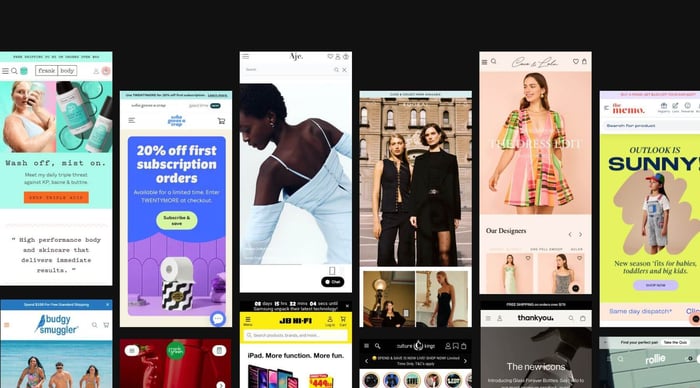
The Shopify Editions Summer '24 is here, bringing over 150 exciting updates to enhance your ecommerce experience. In this article, we'll break down the eight game-changing updates you need to know to elevate your Shopify store.
Shopify is constantly evolving, adding new features and expanding its capabilities to meet the ever-changing demands of the ecommerce landscape. Millions of merchants rely on Shopify to grow their businesses, whether entering new markets, scaling up wholesale, or managing a global network of retail stores.
With Shopify Editions Summer '24, Shopify introduces over 150 updates that unify key workflows and infrastructure, making the platform faster, more reliable, and better integrated than ever. These enhancements are designed to help you manage and grow your business more efficiently from a single, unified commerce platform.
Read on to discover the top 8 updates that will streamline your operations and open up new opportunities for business growth.
1.The Reimagined Markets
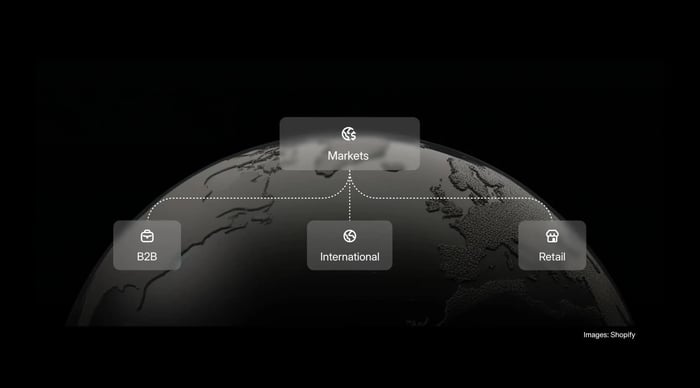
Currently, Shopify merchants adding new retail stores, scaling into B2B, or expanding to new international markets require managing each business configuration in different parts of the platform, creating multiple disjointed experiences, and requiring business owners to be pros in the Shopify admin.
Now, via Shopify Editions Summer '24, Shopify has introduced a new central command centre for expansion called Markets. With Markets, you can expand internationally, do B2B, or manage retail, all from one screen and one store. This means you can create custom experiences for each market without dealing with multiple stores or scattered workflows.
Markets give you a complete overview of your operations, showing all the markets you're in, how each one is set up, and how they all work together. In the next few months, if you're already selling cross-border, B2B, or retail with Shopify, you'll see your existing markets in the new Markets interface.
2. Rebuilt Unified Analytics
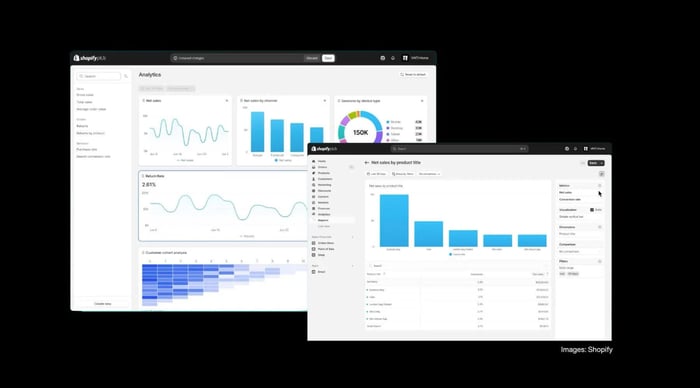
As a business owner, you can only uncover the power of your data when you use it to answer your unique and specific business questions. That's why in Shopify Editions Summer '24, Shopify has completely rebuilt and unified its analytics to give you access to relevant, real-time performance data that's comprehensive and easy to explore.
Here's what you can look forward to:
Custom Dashboards: Create a dashboard that fits your needs. Drag, drop, resize, and customise metric cards to focus on what matters most to your business.
Pre-Built Commerce Reports: Access a new library of pre-built reports to answer common questions like, "How did my sales this week compare to last week?" These reports are ready to use, saving you time and effort.
Enhanced Custom Reporting: Take your analysis further with the ability to edit pre-built reports. Combine different metrics and dimensions to dive deeper into your data and get a more detailed view. For instance, you can now see your conversion rate alongside sessions in a single report and take action:
High conversion rate & low sessions: your traffic is high-quality, but you may need to increase your reach.
High sessions & low conversion rate: you’re getting lots of visitors, but they aren’t converting. Focus on improving the user experience.
Increasing sessions & decreasing Conversion Rate: check your marketing strategies and site performance to ensure you’re attracting the right audience.
Advanced Reporting with ShopifyQL: Coming soon, ShopifyQL will allow you to query your data directly within your reports. This powerful tool lets you extract and analyse data in more complex ways and create advanced reports tailored to your business needs.
3. New Style Settings for Themes

The new style settings for themes are available only for theme developers, and you’ll soon be able to experience these updates in new and updated Shopify themes that will allow you to customise the layout of sections and blocks fully. The new layout panel lets you adjust settings like direction, alignment, and spacing between images or text blocks, enabling you to create a unique look easily.
Mobile-Specific Settings
Style settings can be tailored for different devices, ensuring your site looks great on mobile without requiring separate settings. This adaptability allows you to maintain a cohesive appearance across all devices effortlessly.
Need help to optimise your Shopify shopping experience? Let’s talk
4.AI Suggested Categories & Attributes
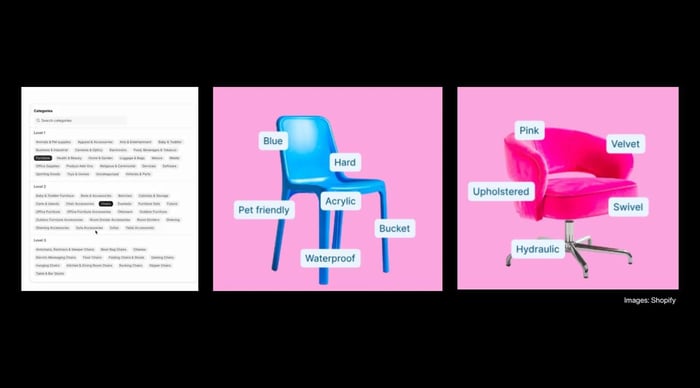
Shopify's Standard Product Taxonomy is a giant library of product data across more than 26 business verticals that maps over 10K product categories with over 1K associated product attributes.
When you add a new product to Shopify, Shopify Magic will use AI to suggest categories and attributes by default. This feature will help you classify and store essential, relevant data for each product, ensuring that you provide buyers with what they are looking for when they search for your products.
5. Image Filter for search

For instance, if a customer is shopping for a lamp, you can go beyond standard filters like colour, material, and price and let them narrow their search with a visual filter by the shape of the lamps.
6. Split Shipping in Checkout
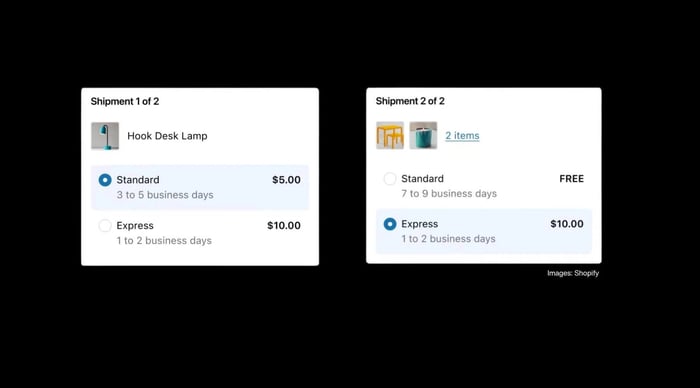
If multiple shipment speeds are available, customers can select options between the lowest price or fastest or even customise for each shipment so that they have more control over speed and cost of delivery.
So, let's say you are shopping at a furniture store and might need a desk lamp delivered quickly to replace a broken one in your home office. The sofa and pre-order chair can both arrive later at different times with standard shipping.
Providing customers with clear expectations about shipping options and delivery dates builds trust and provides peace of mind to your customers, knowing exactly when each item will arrive.
7. Ship To & From Retail Stores
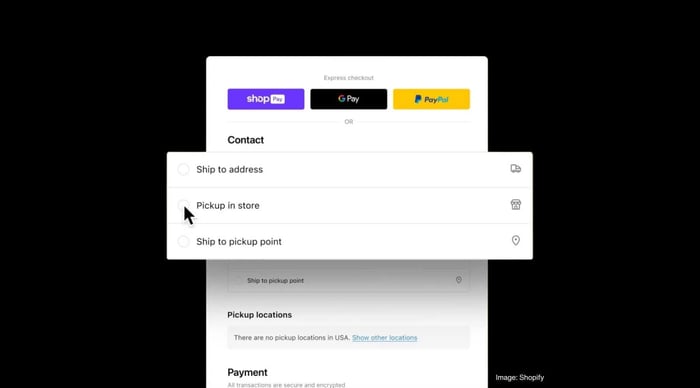
Transfer to a Pickup Location
What if a customer wants to buy online and pick up in a nearby store, but the product isn't available there? With the pickup in-store feature, you can enable and configure store transfers to get products to the desired pickup location. This leverages your retail stores and distribution centres network, providing more convenient pickup options. Available for all Shopify plans.
Ship from Store Fulfilment Workflow
If you are using Shopify POS, you can now implement the new ship-from-store fulfilment workflow. It will allow all your retail locations to help fulfil orders, reducing pressure on any single store. This helps save on shipping costs and speeds up order fulfilment. If one store is too busy, you can reassign the order to another store for quicker delivery.
8. Fulfillment Automation
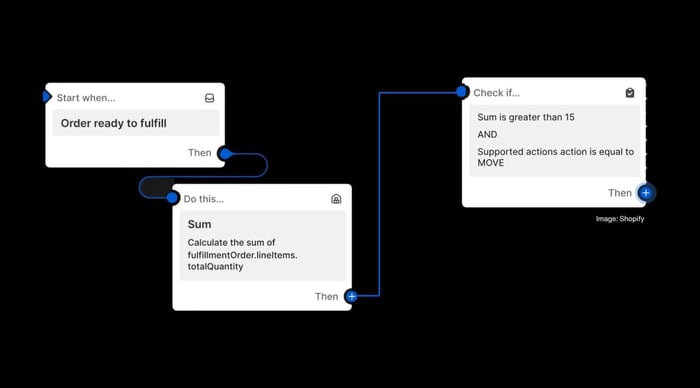
Move Fulfillment Order: Change the fulfilment location for an order to manage inventory across multiple locations efficiently, learn more.
Mark Fulfillment Order as Fulfilled: Automatically update the order status in Shopify when an order has been shipped, ensuring accurate records and customer notifications, learn more.
Fulfillment Order Merged: Combine multiple fulfilment orders from the same location into one, simplifying the process and potentially reducing shipping costs, learn more.
In conclusion, the Shopify Editions Summer '24 updates provide the tools to set your business up for future success. Review your current commerce stack and growth strategy to evaluate which new updates you can take advantage of and whether you can use the new simplified management capabilities to enter new international markets more easily. Look for ways to automate repetitive tasks and use your enhanced analytics to identify growth opportunities.
Need help maximising the latest Shopify updates? Let's talk
FAQs
What is Shopify Editions Summer ’24?
This is the latest major update from Shopify — the Summer ’24 Edition bundles 150+ platform updates designed to better unify commerce, meaning merchants can grow, scale and build more seamlessly.
Why should I care about Shopify Editions Summer ’24 for my store?
Because it introduces significant enhancements such as a new unified “Markets” set-up (for B2B, retail, international), major improvements in analytics including real-time dashboards and ShopifyQL query access, and AI-powered tools to automate tasks and boost efficiency.
What are the top new features in Shopify Editions Summer ’24?
Some standout features include:
A new “Markets” dashboard where selling internationally, to B2B, or via retail is managed from one place.
AI-tools: image editing everywhere (including mobile), product attribute suggestions, and the early access “Sidekick” commerce assistant.
Enhanced analytics: rebuilt stack for faster-more flexible reporting, and support for ShopifyQL queries.
Style settings for themes: more layout flexibility, static blocks & block targeting for developers.
Split shipping in checkout: show customers when orders ship in multiple deliveries and let them choose (e.g., fastest, cheapest) shipping.
Retail-store integration: “Ship to & from” stores, digital receipts, returns context in POS.
When did Shopify Editions Summer ’24 launch?
The announcement went live on 24 June 2024. So you’ll likely see features roll-out gradually after that date.
Will my existing Shopify store be automatically upgraded to these features?
Many features will become available in your admin automatically or via toggles, but some (especially theme or structural changes) may require manual updates, theme upgrades or partner/developer assistance. Best practice: audit and plan the adoption rather than flip everything on immediately.
Are there any additional costs associated with Summer ’24 features?
The release notes don’t call out mandatory extra costs for core features, but as with all major platform upgrades: some advanced functions (e.g., custom theme rebuilds, headless storefronts, specialized apps) may incur extra cost. It’s wise to review the feature-compatibility with your plan and tech stack.
How can I make the most of Shopify Editions Summer ’24 for my business?
Review your growth goals (international expansion, B2B, retail, analytics maturity) and map which new features align.
Prioritise features with highest ROI (e.g., unified markets if you already sell overseas, analytics if your data stack is weak).
Update your theme / storefront strategy to take advantage of new style settings and AI tools — this may require a developer.
Use the new analytics dashboards + ShopifyQL to ask sharper business questions (e.g., what drives conversion, what’s performing by market).
Train your team / process to adopt new workflows (especially retail staff, if using Ship to & from stores).
Does Summer ’24 support both online and physical retail stores?
Yes. For example, there’s “Ship to & from retail stores” functionality and POS features like digital receipts, return-rule context for staff, and unified staff attribution.
Where can I find detailed guidance on each new feature in Summer ’24?
You can refer to Shopify’s official “Highlights from the Summer ’24 Edition” page and the dedicated developer release notes. Also: the Shopify Help Center and developer docs on Shopify.dev are updated for relevant features.